
Product Updates: visitor code, badge printing, scored quiz…
The days are getting shorter and the year-end audits are approaching.
At Anghello, the autumn was devoted to a question that only looks simple: how does a visitor get into your site? The one who is expected, the one who isn't, the one coming back for the tenth time, the one without a smartphone...
The answers come down to a few new features that work together, and a series of adjustments drawn from your feedback.
The visitor code: being recognised without an email or a smartphone
How do you recognise a regular visitor standing in front of the kiosk, with no phone in hand and no invitation to dig out of their inbox?
Until now, recognition relied on the invitation link or on the data stored on the visitor's phone. Two good options, provided there is an email address and a smartphone. On a loading dock or at the entrance to a workshop, that isn't always the case.
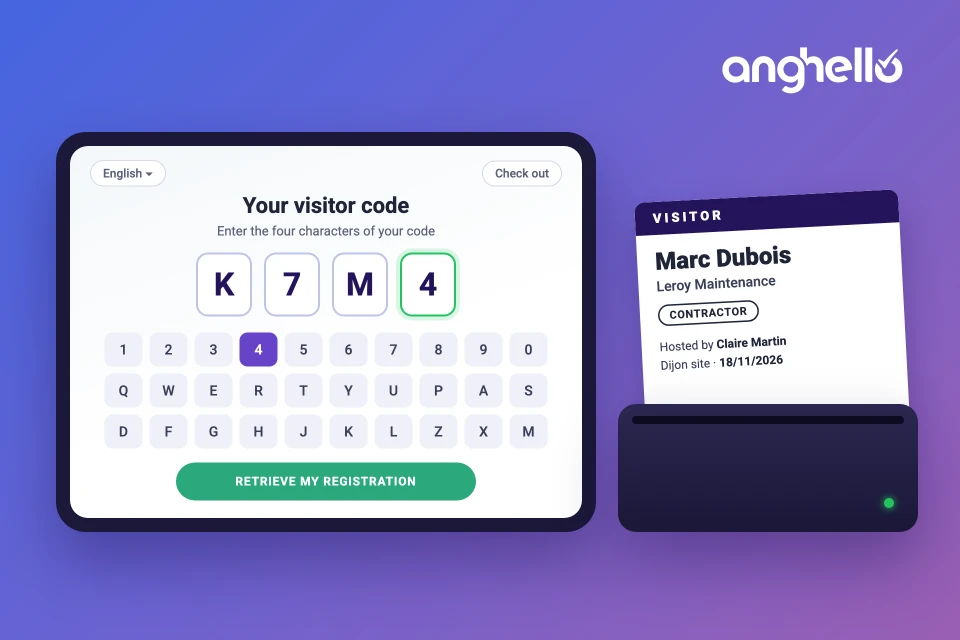
Every visitor contact now has a visitor code: four characters, letters and digits, chosen so that they can't be mistaken for one another when read. At the reception kiosk, the visitor enters their code: their registration is retrieved, and only what is missing is requested.
But how does the visitor know their code?
- The code appears in the invitation email, along with the arrival instructions;
- It can be viewed in the contact record, hidden by default and displayed on request;
- On a phone, it is remembered on the visitor's device for their next visits.
A direct consequence: the email address becomes optional at pre-registration. Without an address, no invitation is sent, and the code serves as the means of recognition. You can pass it on by phone or write it on a work order.
Visit preparation opens up to unannounced visitors
Early check-in, introduced at the end of the summer, required an invitation. But what about the contractor who turns up without anyone having pre-registered them?
If you enable it, an unannounced visitor can now prepare their visit themselves: they fill in their details, review your safety instructions and complete the questionnaire. They leave with their visitor code.
That preparation isn't single-use. The visit stays open after the first arrival, so the code retrieves it on every subsequent visit. A preparation that was never followed by an arrival expires on its own after seven days.
In the extended visits tab, a new filter also separates visits created by a host from those created by the visitor.
Settings that follow the visitor journey
New features pile up, and so do settings. It was time to put them back in order.
The pre-registration tab gives way to a Registration policy tab, built around one idea: describing how people enter your site, rather than lining up toggles.
It's simple:
- You start from a ready-to-use template, which you can then customise;
- You answer an explicit question: how does an unannounced visitor get in? Anonymously, with a contact memory, or by preparing their visit themselves;
- A preview of the kiosk welcome screen updates as you make your choices;
- A summary recaps the steps of the journey and the notifications that follow from them.
The overview of a site's settings follows the same logic: it reads in the order in which the visitor experiences things.
A redesigned welcome screen
Whether it's the reception tablet at the entrance or the interface visitors use on their smartphone, everything has been reworked. The welcome screen adapts to every screen size, the language selector and check-out are available at the top to save space on smartphones, and the visitor code is entered on an on-screen keyboard at the reception kiosk.
For a company organising self-service visitor check-in, it is one more entry point for those who can't scan a QR code.
Visitor badge printing
The virtual badge is enough in many cases. But how do you spot at a glance, in a workshop or a warehouse, who is a visitor and who is expecting them?
Anghello can now print a paper badge when the visitor arrives: their name, their company, their visitor type, the person hosting them, the site and the arrival date.
Three ways to get one:
- on the reception tablet: the badge prints automatically at the end of check-in;
- by QR code: the visitor checks in on their phone, and the badge comes out a few seconds later on the reception printer;
- from the admin portal: one click on the visit to reprint a lost or damaged badge.
If the printer is switched off or out of paper, the check-in is validated all the same: an empty roll shouldn't block an entry.
Let's be precise about the hardware. Printing currently works with an Android tablet running the Anghello app and a Brother QL-820NWBC label printer connected over Wi-Fi. iPads and other printer models are not supported. Printing by QR code and reprinting from the admin portal are enabled site by site, on request to our team.
Everything is covered in the badge printing setup guide.
A safety quiz with a pass rule
Is a quiz there to teach or to check? Both answers hold up, and you now choose your own, per site and per visitor type:
- the number of attempts per question, from one to three;
- a minimum score, from 0 to 100%: at 0%, the quiz remains educational; above that, the attempt is only validated if the score is reached;
- showing the correct answer after a failed attempt, and showing the score to the visitor, depending on whether they answer during visit preparation or on site.
The score and the outcome are recorded on the visit and included in the arrival email. One point to keep in mind: a failed attempt does not prevent the visitor from entering. It removes their exemption, and the quiz is put to them again. The access decision stays in the hands of your teams.
Sites that are already configured have nothing to do: the default values reproduce the behaviour they had before.
Revalidation, when you ask for it
At the end of the summer, we wrote that the validity of the safety onboarding lapsed as soon as you changed the content. You pointed out that fixing a typo shouldn't send two hundred contractors back to the questionnaire. Fair enough.
Revalidation therefore becomes an explicit request: you edit your instructions or your questions freely, and you then decide whether they need to be retaken. The request can cover the whole site, a visitor type or a specific question.
Along the same lines, visitors who arrive without a pre-registration now have their safety induction kept on record: by ticking "I have already visited this site", they are recognised and exempted from whatever is still valid, on the tablet as well as by QR code.
Two more languages for your visitors
Turkish and Czech join the languages offered to visitors, whether check-in happens by QR code or at the kiosk, with support for the characters specific to these two languages in names. That brings the number of languages available on the visitor side to eleven.
An infrastructure spread across three zones
Less visible, but just as important: this autumn, we migrated Anghello to a new infrastructure, still hosted in France.
Your data is now replicated in real time across three separate data centres in the Paris region. If one of them fails, the other two take over automatically.
Why mention it here? Because a visitor log and evacuation lists have to stay available, especially on the day something goes wrong.
Also worth mentioning…
- Check-out can be restricted to reception devices: the visitor no longer checks themselves out from their virtual badge, they report their departure to reception or to their host;
- The employee list can be exported as a CSV, in a format that can be re-imported directly, and the import accepts a Status column;
- An Integrations entry in the menu, with the Microsoft Teams app available from the Microsoft marketplace and reduced permissions;
- Devices connected to a site can be renamed;
- Form fields accept labels of up to 120 characters, with adjustable placement and a default country for phone numbers;
- The copy sent to reception of the verification email addressed to the host can be turned off.
A visitor recognised in a few taps, settings that read like a journey, a quiz whose rule is clear to everyone: for a simpler, traceable visitor reception.
Thanks to our customers and partners for their feedback from the field, which shapes a good part of what you have just read 🚀